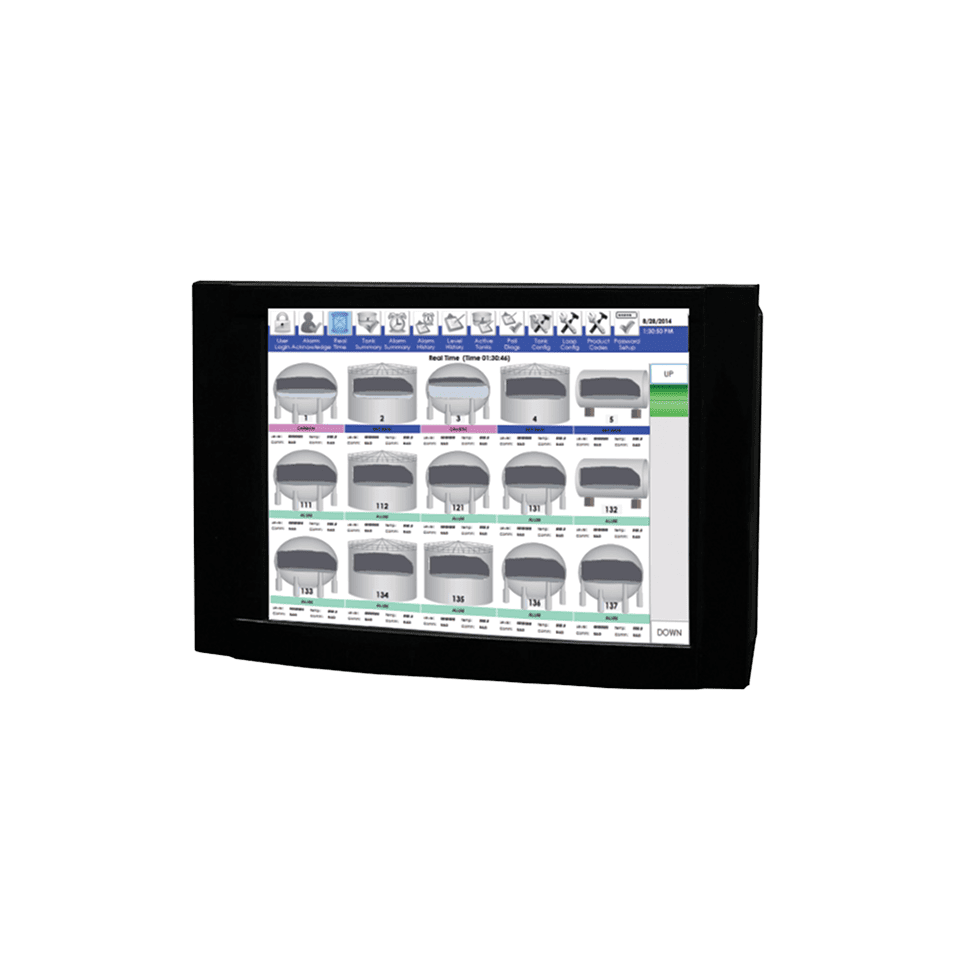
MCG 3630
MCG 7030
01

Touch Panel Displays

MCG 3630, MCG 7030
Centralized tank data, alarms, and control.

What It Is & How It Works

A touch panel display is a compact, industrial-grade touchscreen that continuously polls field instruments and presents real-time tank data through a graphical interface operators can interact with directly. Connected to level gauges, temperature probes, alarm devices, or field interfaces, the panel gathers measurement and status information and displays it as graphical tank views, tabular summaries, alarm annunciation, and event logs, all from a single screen.

The panel communicates with field instruments over serial, Ethernet, or wireless connections using configurable protocols. As data arrives, the system updates tank-by-tank displays showing level, temperature, alarm states, and communication health. Operators acknowledge alarms, review event history, configure tank parameters, and set alarm thresholds through the touchscreen without external keyboards or tools. Host communication ports pass data upstream to SCADA systems, inventory management platforms, or centralized control rooms.

Installation involves mounting the panel in a control building, pump station, or field enclosure and connecting to tank instruments via the appropriate wiring or wireless path. The embedded operating system runs continuously and restarts automatically after power interruptions. Tank capacity ranges from 10 to over 100 tanks depending on configuration, and flexible communication options support everything from small single-loop installations to multi-loop, multi-protocol tank farms.

One distinction worth understanding: Cognesense offers two functionally different touch panels. The MCG 3630 is a tank monitor that polls level gauges for inventory data. The MCG 7030 is an alarm monitor that polls alarm probes for overfill protection. Both share a touchscreen form factor, but they serve different system roles and connect to different field devices.

Tank Monitor vs. Alarm Monitor

The MCG 3630 polls level gauges and transmitters for continuous inventory data, including level, temperature, BS&W, density, and volume. The MCG 7030 polls alarm probes (MCG 1090, MCG 1095, MCG 1097) for independent overfill protection with self-testing diagnostics. One provides operational visibility; the other provides safety-layer compliance. Many facilities deploy both.

When to Choose a Touch Panel Display

Touch panel displays are selected when operators need centralized visibility and local control across multiple tanks:

  • Tank Farms and Terminals Multi-tank facilities where operators need level, temperature, alarm status, and inventory data consolidated on one screen rather than visiting individual gauges.
  • Independent High-Level Alarm Systems Overfill prevention applications requiring an alarm monitor that meets EPA high-level alarm requirements and provides self-testing, event logging, and alarm annunciation independent of the gauging system.
  • Petroleum Refineries and Chemical Storage Facilities handling crude, refined products, chemicals, or blended materials where real-time visibility into product level, temperature, and alarm conditions reduces response time.
  • Retrofit and Modernization Projects Upgrading legacy field instruments to a modern graphical interface without replacing gauges or modifying tank penetrations.
  • Remote or Unmanned Sites Locations where a local operator interface provides essential visibility without a full SCADA deployment.
MCG 3630, MCG 7030
MCG 3630, MCG 7030
02

Why It Excels

01

Facilities Managing Multiple Tanks from One Location

A single panel aggregates data from up to 100 tanks, replacing the need to visit individual gauge displays across a tank farm.

02

Operations Requiring Fast Alarm Response

Graphical alarm annunciation with audible alerts, color-coded status, and one-touch acknowledgment reduces the time between alarm detection and operator action.

03

Sites Needing Independent Safety-Layer Monitoring

The MCG 7030 provides a dedicated, self-testing alarm system that operates independently of the gauging system, satisfying the independent-layer requirements of API 2350 and EPA SPCC overfill prevention.

04

Environments Where Simplicity and Reliability Matter

Embedded industrial hardware with no external keyboards, automatic restart after power loss, and password-protected configuration reduces failure modes in field conditions.

03

Choosing the Right Touch Panel

Attribute MCG 3630 Touch Panel Tank Monitor MCG 7030 Touch Panel Alarm Monitor  
Primary function
Continuous inventory monitoring, including level, temperature, BS&W, density, and volume Independent high-level alarm monitoring with self-testing probe diagnostics  
Field devices
Level gauges and transmitters (servo, radar, float & tape) Alarm probes (MCG 1090 wired, MCG 1095 wireless, MCG 1097 HART wireless)  
Tank capacity
10 to 100 tanks Up to 128 alarm probes (wired) or 48 (individually wired controller mode)  
Data displayed
Level, temperature, BS&W, density, gross/net volume, product name, alarm status Probe displacer status, alarm state (High, High-High, Comm), event history, test results  
Volume calculations
Yes, including strapping tables and temperature-compensated net volume No, alarm status only  
Self-testing capability
No Yes, with automated and scheduled probe diagnostic testing  
Regulatory alignment
Inventory management, custody-transfer support EPA high-level alarm, API 2350 independent alarm layer  
Recommendation
Choose when operators need real-time inventory visibility across a tank farm, with level, temperature, volume, and alarm data on one screen. Choose when the facility requires an independent, self-testing overfill alarm system that monitors alarm probes separately from the gauging system.  

What to Consider Alongside Touch Panel Displays

Consider an alternative when:

  • You need only single-gauge access for calibration and diagnostics at individual tanks. See Ground Level Displays.
  • You need enterprise inventory management with volume corrections, tank strapping, and multi-site reporting. See FuelsManager®.
  • You need data aggregation and protocol conversion for host systems without a local operator display. See Field Interface Devices & RTUs.

How Touch Panel Displays Fit Into a Larger System

  • Touch Panel + Level Gauges for centralized inventory visibility. The MCG 3630 polls servo, radar, float & tape, and magnetostrictive gauges to present real-time level, temperature, volume, and alarm data from a single operator station. See Servo Level Gauges and Radar Level Gauges.
  • Touch Panel + Level Alarm Probes for independent overfill protection. The MCG 7030 connects to MCG 1090 or MCG 1095 alarm probes for self-testing, EPA-compliant high-level alarm monitoring that functions independently of the gauging system. See Level Alarms.
  • Touch Panel + FuelsManager® for layered architecture. Touch panels provide local operator visibility at the tank farm while FuelsManager handles centralized inventory, compliance reporting, and custody-transfer calculations across the enterprise. See FuelsManager®.
04

Featured Products

01

MCG 3630 Touch Panel Tank Monitor

Real-time inventory display for level, temperature, volume, and alarms across up to 100 tanks.

02

MCG 7030 Touch Panel Alarm Monitor

Independent, self-testing high-level alarm system for up to 128 alarm probes with EPA-compliant monitoring.

Bottom section image
Measure.
Monitor.
Protect.